Part 1: Introduction to Android Security: Architecture, Sandbox, IPC, and System Protections
Before diving into Android exploitation, reverse engineering, or fuzzing, it’s important to understand one thing clearly:
Android is not easy to break by design.
It is built as a layered, security-first operating system where multiple mechanisms work together to isolate applications, control access, and protect the system from compromise.
In this post, we’ll walk through the core fundamentals of Android security—covering architecture, sandboxing, permissions, IPC, SELinux, and Verified Boot. These concepts form the foundation for anyone interested in Android security research or exploitation.
1. Android Architecture: The Foundation of Security
Android follows a layered architecture, where each layer depends on the one below it. This design is not just for modularity—it’s a key part of its security model.
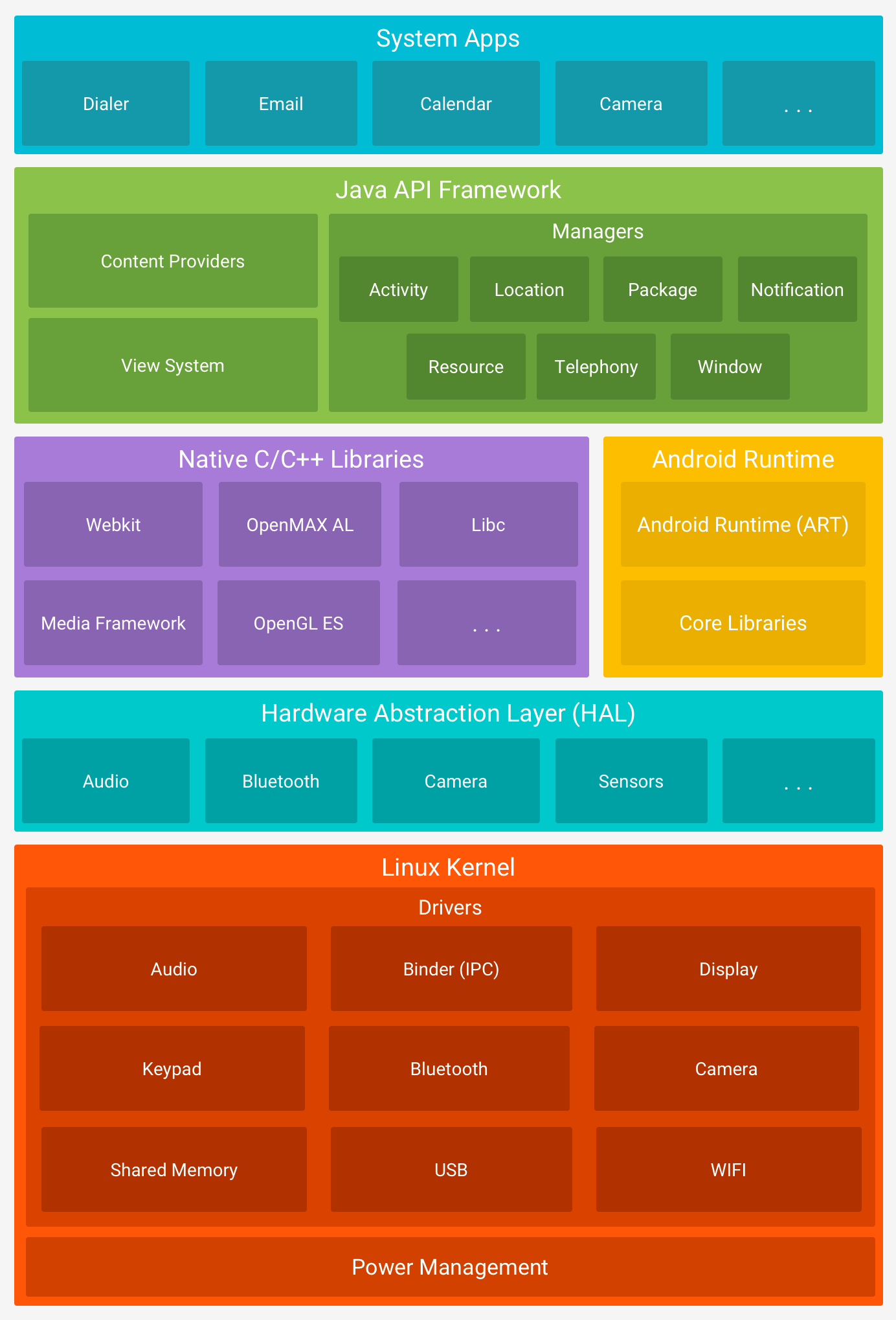
Key Layers of Android
Linux Kernel
The core of Android. Handles:- Process management
- Memory management
- Hardware drivers
- Security enforcement
Native Userspace
Contains low-level system components and native libraries.Android Runtime (ART) / Dalvik VM
Executes Android applications in a managed environment.Java Runtime Libraries
Provides standard APIs for application development.System Services
Core services like Activity Manager, Package Manager, etc.IPC Mechanisms
Enables communication between isolated processes.Android Framework
High-level APIs developers interact with.Applications
Both system apps and user-installed apps.
Why This Matters
This layered structure ensures:
- Strong isolation between components
- Reduced attack surface
- Controlled access to critical resources
2. Android Security Model: Layered Defense
Android security is not based on a single feature—it’s a combination of multiple mechanisms working together.
Core Security Pillars
- Application Sandbox
- Permissions
- Inter-Process Communication (IPC)
- Code Signing
- SELinux
Among these, the Application Sandbox is the most critical.
3. Application Sandbox: The Core Isolation Mechanism
At the heart of Android security lies the Application Sandbox.
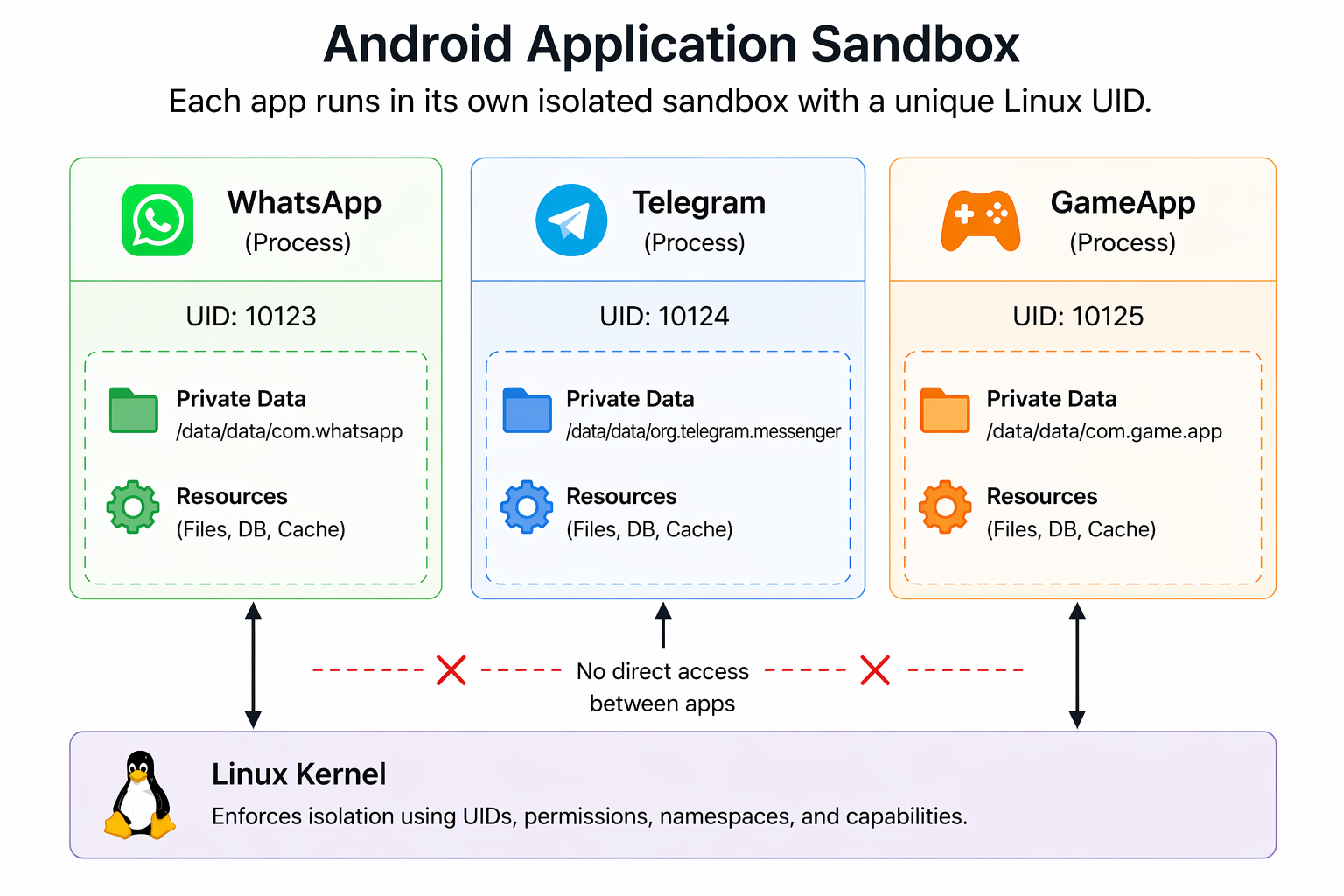
How the Sandbox Works
When an app is installed:
- It gets a unique Linux UID (User ID)
- It runs in its own separate process
- Its data is stored in:
1 | /data/data/<package-name> |
This means:
- Apps cannot access each other’s files
- Apps cannot interfere with each other directly
Security Protections Inside the Sandbox
File Isolation
Each app has private storage enforced by Linux permissionsW^X (Write XOR Execute)
- Code → Read + Execute
- Data → Read + Write
Prevents code injection attacks
Seccomp-bpf
Restricts which system calls an app can makeSELinux Policies
Adds an additional layer of enforcement
4. Sandbox Escape: Where Attacks Actually Happen
The sandbox itself is strong. Attackers don’t break it directly—they bypass it by targeting lower layers.
Common Escape Paths
- Kernel vulnerabilities
- System services
- Binder IPC flaws
- Hardware drivers (GPU, Wi-Fi, etc.)
These are the real targets in advanced Android exploitation.
5. Android Permissions: Controlled Access
Even though Android apps are isolated using sandboxing, they still need access to certain system features like the camera, storage, or network. This is handled through the Android permission system.
Permissions help protect:
- User data (contacts, location, files)
- Sensitive actions (camera, microphone, Bluetooth)
How Permissions Work
Apps declare required permissions in the AndroidManifest.xml
Depending on the type, permissions are either:
- Granted automatically (install-time)
- Requested from the user at runtime (dangerous permissions)
For example, accessing the camera requires user approval while the app is running.
Behind the Scenes
Android doesn’t just manage permissions at the application level—it enforces them using the Linux kernel.
Internally, Android maps high-level app permissions to Linux Group IDs (GIDs). This mapping is defined in a system file:
1 | /system/etc/permissions/platform.xml |
Example
1 | <permission name="android.permission.BLUETOOTH_ADMIN"> |
What Happens Internally
- When an app is granted
android.permission.BLUETOOTH_ADMIN - The system assigns the app to the
net_bt_adminLinux group - The Linux kernel enforces access control based on this group
Workflow for using permissions
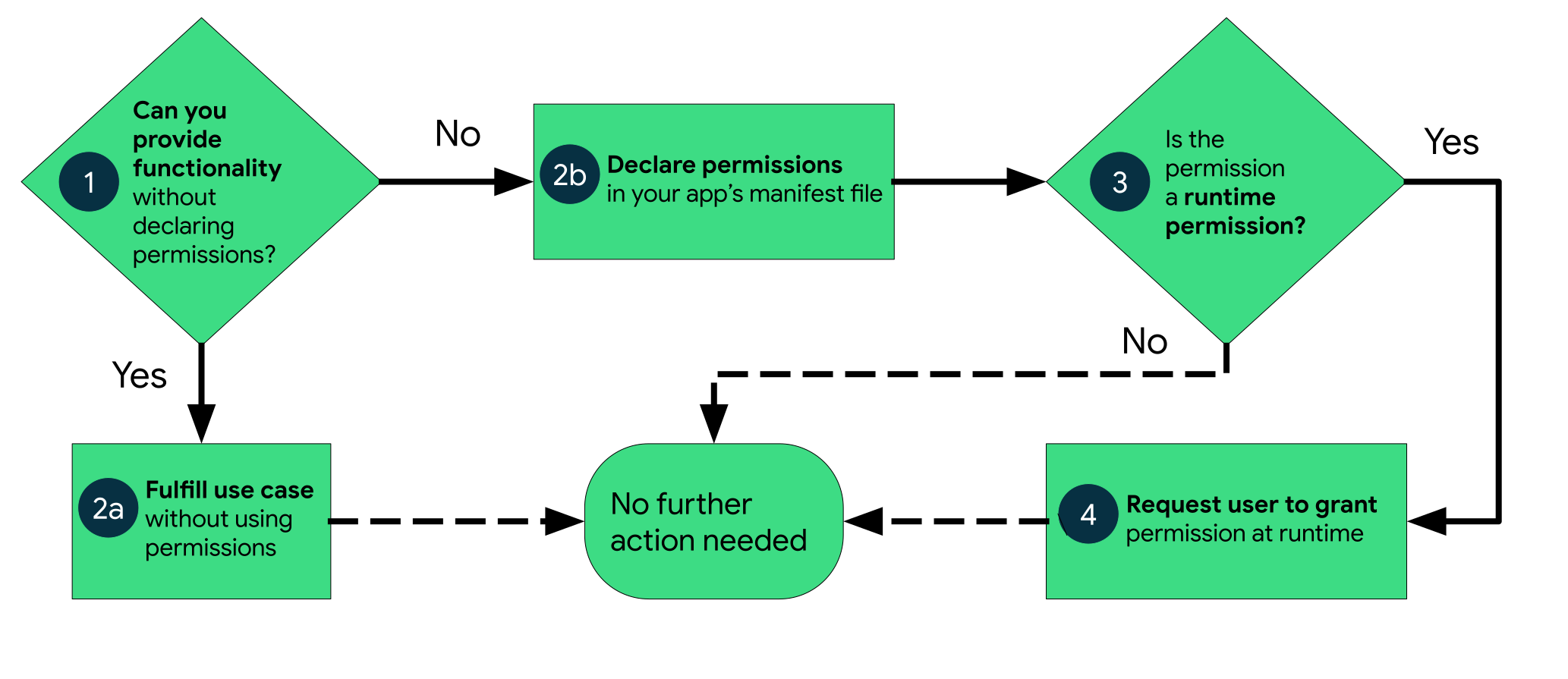
The permission workflow in Android is straightforward: an app first checks if it needs access, declares the required permission, and if it involves sensitive data, the system prompts the user at runtime. The user can then allow or deny the request, and based on this decision, the app either gains access or is restricted. This ensures users stay in control of their data while the system enforces security in the background.
6. Binder IPC: Communication Between Apps
Android applications run in isolated sandboxes, which means they cannot directly communicate with each other. To enable secure communication between apps and system services, Android uses Binder IPC (Inter-Process Communication).
How Binder IPC Works
When an app wants to interact with another app or a system service, it doesn’t communicate directly. Instead:
- The app sends a request (called a parcel)
- The request is passed through the Binder driver (
/dev/binder) - The Linux kernel verifies the sender’s identity and permissions
- The request is delivered to the target service
Key Components
- Binder Driver – Kernel-level component handling communication
- Binder Client – The app making the request
- Binder Service – The app/service receiving the request
- Transactions – Structured messages exchanged between processes
Why Binder is Important
- Ensures secure and structured communication
- Prevents direct memory sharing between apps
- Allows the kernel to enforce UID-based security checks
Security Perspective
Binder is one of the most critical parts of Android’s architecture. Since most interactions with system services go through Binder, it becomes a major attack surface for vulnerabilities in Android.
7. SELinux: Mandatory Access Control
Android strengthens its security model using SELinux (Security-Enhanced Linux), a powerful mechanism that enforces strict access control policies at the kernel level.
What is SELinux?
SELinux is a Mandatory Access Control (MAC) system originally developed by the NSA. Unlike traditional permission systems, where access is based on user identity, SELinux defines what each process can and cannot do, regardless of user permissions.
It follows a simple rule:
Anything not explicitly allowed is denied.
Modes
SELinux operates on the principle of default denial: Anything not explicitly allowed is denied. SELinux can operate in two global modes:
Permissive Mode,
in which permission denials are logged but not enforced.Enforcing Mode (Default in Android)
in which permissions denials are both logged and enforced.
App Domains
Each app runs in a restricted domain such as:
untrusted_appsystem_apppriv_appisolated_appand more...
Why It Matters
Even if an attacker gains code execution:
- SELinux limits what that code can do
8. Verified Boot: Trust Starts at Startup
Verified Boot strives to ensure all executed code comes from a trusted source (usually device OEMs), rather than from an attacker or corruption. It establishes a full chain of trust, starting from a hardware-protected root of trust to the bootloader, to the boot partition and other verified partitions including system, vendor, and optionally oem partitions. During device boot up, each stage verifies the integrity and authenticity of the next stage before handing over execution.
How It Works
- When the device starts, the bootloader verifies the integrity of the system
- Each stage of the boot process verifies the next (chain of trust)
- Android uses DM-Verity to check system partitions for tampering
Final Thoughts
Android security is built as a multi-layered defense system:
- Kernel-level isolation (UID-based sandbox)
- Permission enforcement via Linux groups
- Binder-controlled communication
- SELinux mandatory policies
- Verified Boot integrity checks
To compromise an Android device, an attacker must bypass multiple independent layers, not just one.